Using Buffer Home
Buffer Home is your central starting point in Buffer — a single page that brings your posting habits, upcoming content, recent comments, and quick actions together so you can see what matters and jump in. Whether you're connecting your first channel or managing a busy publishing schedule, Home is built to meet you where you are.
📝 Notes:
- Home is rolling out to all Buffer users. If you signed up on or after June 16, 2026, you'll see it now. If you joined before then, it'll appear in your sidebar soon. (Until then, your default landing page will be Publish).
- Home is only visible to organization owners. Every Buffer account includes its own organization where you're the owner, so you'll always have access in your own org. If you're a team member in someone else's organization, you won't see Home there.
In this article:
- What you'll see on Buffer Home
- Insights summary: a 7-day pulse check on your content
- Your posting habits at a glance
- Upcoming posts
- Recent comments
- Templates and inspiration
- FAQ
What you'll see on Buffer Home
Home adapts to where you are in your Buffer journey. The widgets you see depend on whether you've connected a channel yet and how much activity is on your account.
If you haven't connected a channel yet
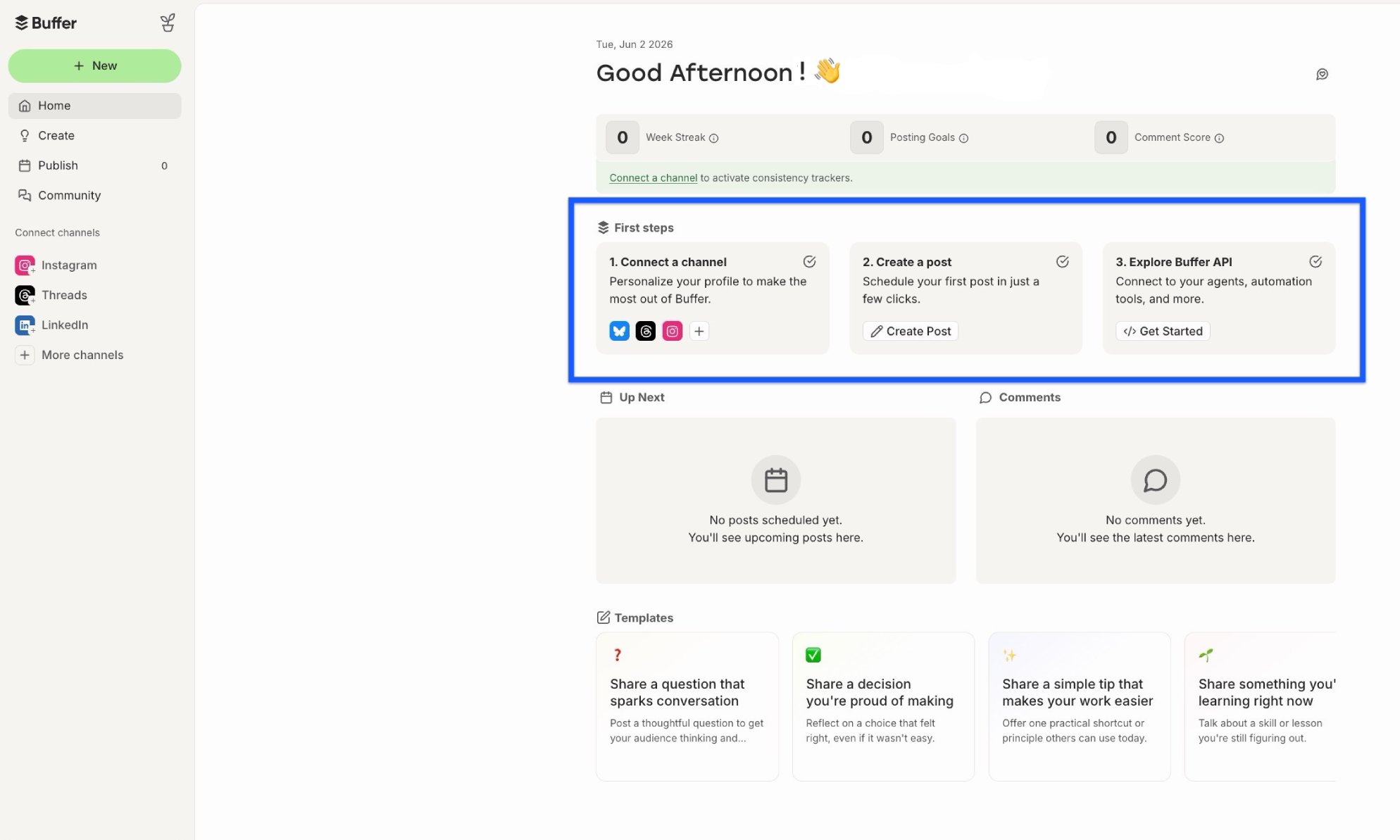
When you first land on Home, you'll see a Tell us about yourself widget. Answering a few quick questions helps us tailor your experience and recommend the right next steps.
You'll also see a First steps section with starter actions to help you get up and running. These adapt based on how you answered the onboarding questions, so what you see may differ from what a teammate or another Buffer user sees. Some of the actions you might come across include:
- Connect a channel — link a social account so you can start scheduling posts
- Create a post — schedule your first post in just a few clicks
- Invite your team — bring collaborators into your Buffer organization
- Explore Buffer API — connect to your agents, automation tools, and more
Once you have a channel connected
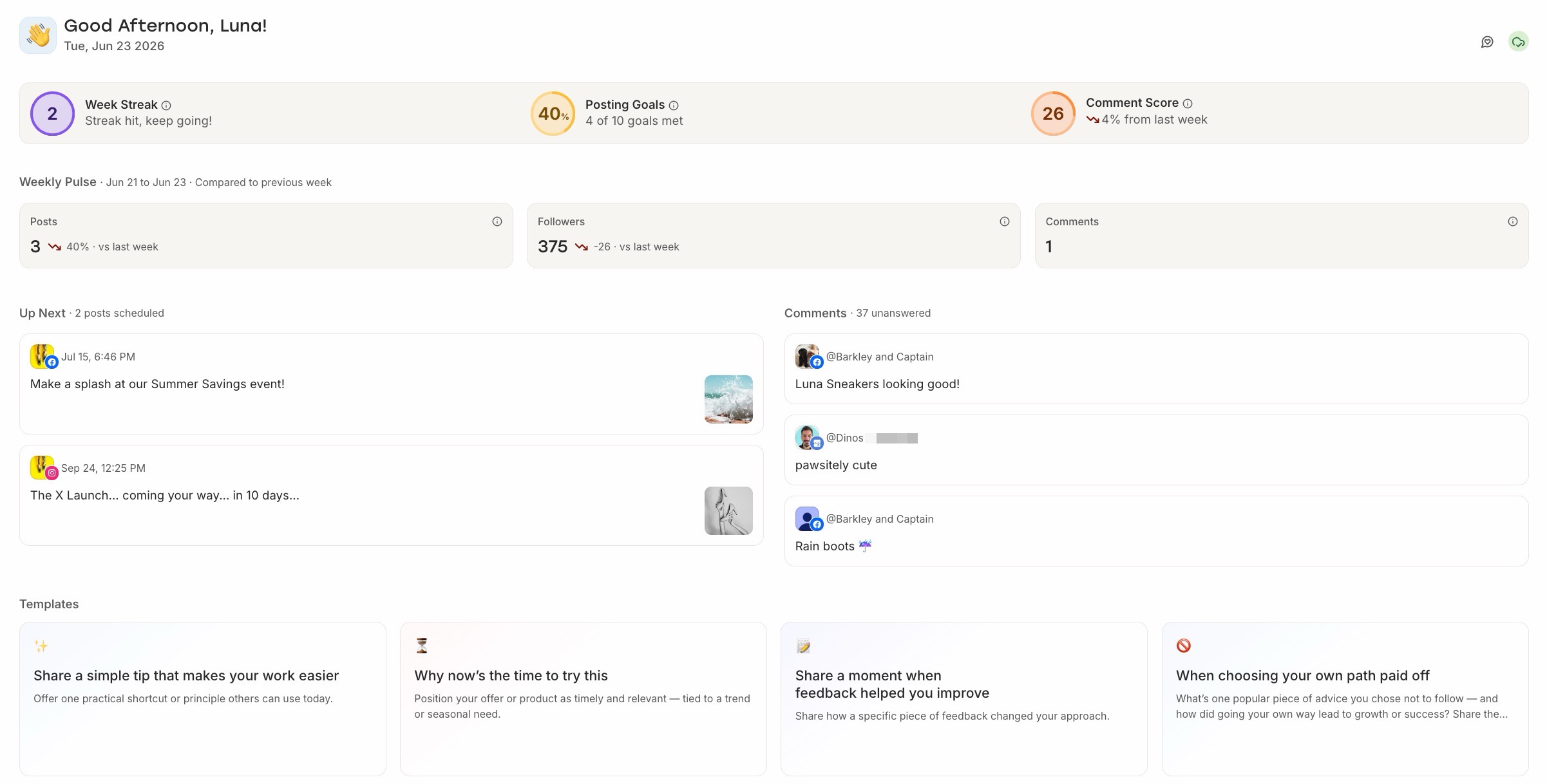
Home shifts to show your activity at a glance:
- A posting habits summary at the top, including your streak, posting goal progress, and Comment Score
- Upcoming posts scheduled across your channels
- Recent comments waiting for a reply
- Templates to spark ideas
Landing page preferences
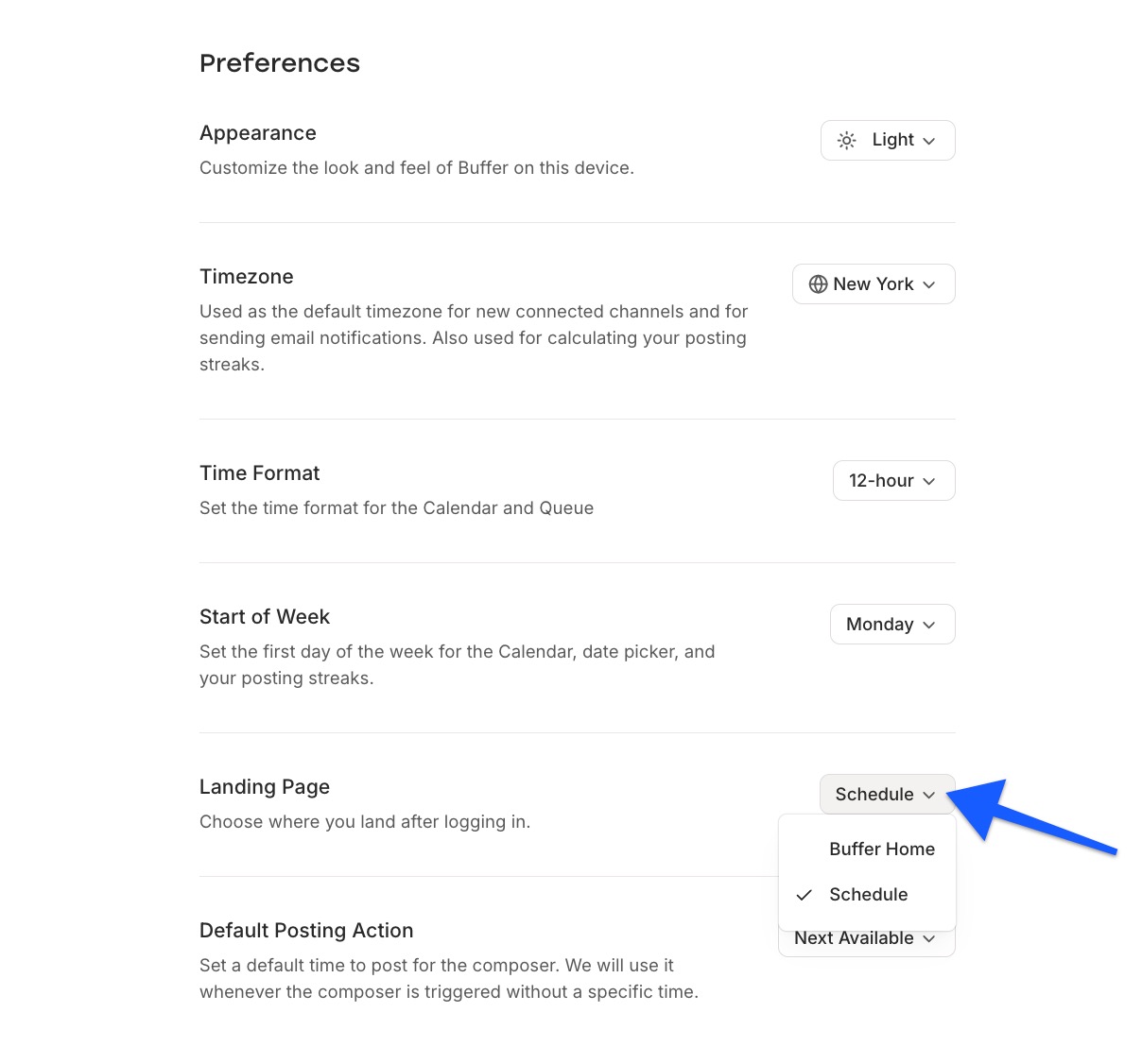
If Buffer Home is available for your account, you can choose whether logging in takes you to Buffer Home or straight to your Schedule.
- Click the profile avatar in the bottom left corner of your account.
- Open Settings → Preferences.
- Find the Landing Page option and pick Buffer Home or Schedule. The next time you log in, Buffer will remember your choice.
Insights summary: a 7-day pulse check on your content
Once you've connected at least one channel, Home replaces the first-steps cards with an Insights summary block. It surfaces the same headline metrics you'd see on the full Insights page — things like engagement rate, follows, impressions, reactions, comments, shares, and saves — for the last 7 days, with a comparison against the previous 7 days so you can see at a glance whether things are trending up or down.
The window on Home is fixed: there's no date or channel picker here. If you want to zoom out, filter by tag or channel, or open up a 30-day view, head to the full Insights page from the left navigation. The numbers and definitions are identical — Home is just the quick read.
📝 Good to know: Insights summary only appears if you have at least one channel connected. If your account is brand new, you'll see the first-steps cards instead until you connect a channel.
Your posting habits at a glance
The widget at the top of Home gives you a quick read on three key habits:
- Streak — how many consecutive weeks you've published at least one post. Learn more about how streaks work.
- Posting goal progress — your combined progress across all channels, shown as posts scheduled and sent vs. your weekly goal. Learn more about setting posting goals.
- Comment Score — a measure of how consistently and quickly you're replying to your community. Learn more about your Comment Score.

📝 Good to Knows:
- Your posting goal on Home is a roll-up across all your channels, not a single channel's goal. To set or adjust the goal for a specific channel, head to the Publish dashboard.
- If you have at least one week of sent posts, you'll also see Sent Posts Insights below the top widget.
💡 Tip: Hover on the info icon for Posting Goals or Comment Score see a detailed breakdown — the Posting Goals tile shows each channel's progress, and the Comment Score tile shows the response rate, response speed, and consistency sub-scores.
Upcoming posts
This section shows up to three of your next scheduled posts across all your connected channels, so you can see what's going out without leaving Home.
- If you have scheduled posts, you'll see them listed with their channel, scheduled time, and a preview of the content
- If you don't have anything scheduled yet, you'll see a prompt to create your next post or start from a template
- Click See all to jump to your full Publish queue
Recent comments
The comments section on Home shows comments from your channels that you haven't replied to yet. Think of it as a focused to-do list of conversations waiting for you. As soon as you reply to a comment or dismiss it, it drops out of this list (you can still find it under Community).
If you've handled all your comments for the week, you'll see a friendly "You're all caught up! 🎉" message instead of an empty list. If no comments have come in this week at all, you'll see the standard "no comments yet" message.
Templates and inspiration
At the bottom of Home, you'll see Templates — pre-built post templates you can use to jumpstart your content. Click a template to open it or click View All to see other templates. Once you find one you want to use for your post, click Use Template to copy it into the composer. Fill in the details, select your channels, schedule your post, and you're done!
FAQ
Why don't I see Buffer Home?
Buffer Home is rolling out gradually to all users and is only visible to organization owners. If you've been invited to another organization as a team member, you won't see Home in that organization's sidebar, only the owner will. Within your own organization, you are the owner. If you're the owner of an organization and Home still doesn't appear, it'll show up in your sidebar above Create once the rollout reaches your account.
What happened to the Welcome Checklist?
The Welcome Checklist has been replaced by Buffer Home. The getting-started steps you're used to (connecting a channel, inviting your team, and creating your first post) now live directly on Home, so everything is in one place from the moment you log in.
Each step can be marked as done or dismissed. Click Mark as done to check off a completed step, or use the dismiss option on Invite your team if it doesn't apply to your setup. Your progress saves automatically across devices, and completed steps stay that way even if you make changes to your account later.
How is the posting goal on Home calculated?
It's a roll-up of your weekly posting goals across every channel you've connected. The number of posts you've scheduled and sent is summed across all channels, and compared to the total of your channel-specific goals. To change the goal for a specific channel, go to that channel's settings in the Publish dashboard.
Does Buffer Home work on mobile?
At this time, Buffer Home is only available on the desktop version of Buffer.
📝 Need help with Buffer Home? Send us an email at hello@buffer.com and our Advocacy team will be standing by to assist!